Viewing Medication
Important - Please be aware, Vision Anywhere only displays Medication from the last 2 years.
To view medication:
- From the Patient Summary screen swipe to see the Medication tile and tap the Medication heading:
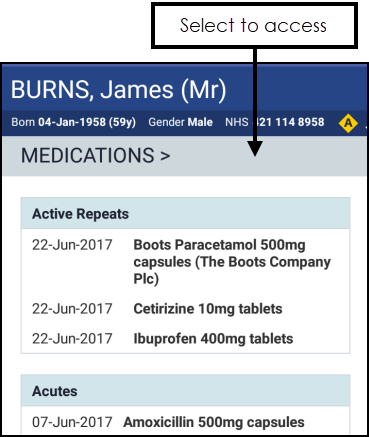
- The Medication screen displays and defaults to active Repeats:
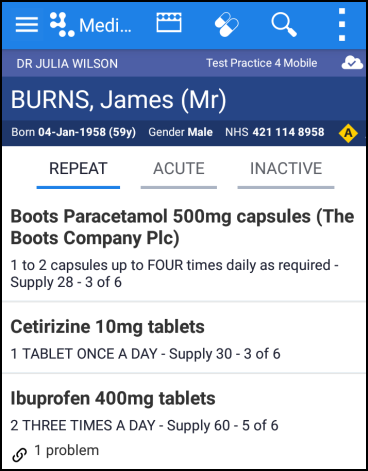
- Selecting an individual drug displays a summary:
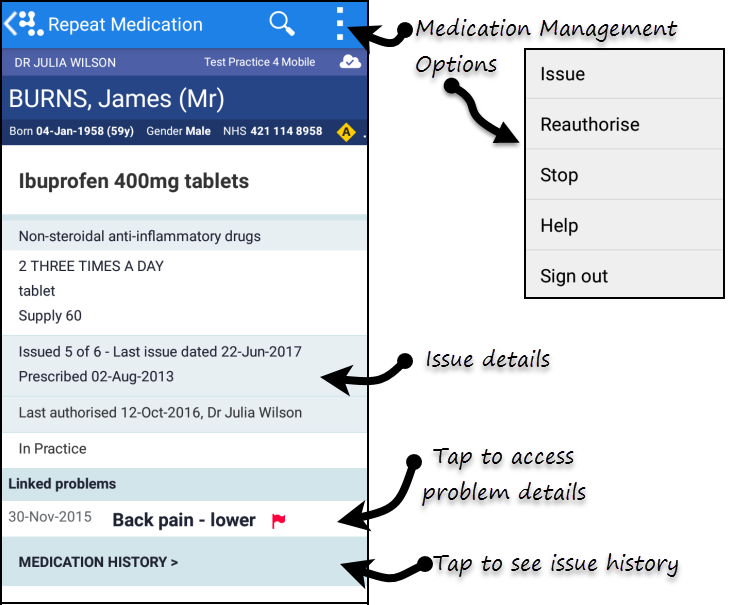
- Last issue date
- Date of initial prescription
- Last authorisation date
- Linked Problems - select to view problem details
- Medical History - select to view
- Repeat Medication management options
- To view the issue history select Medication History. Select Repeat Medication to return to previous screen.
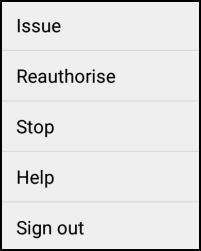
- To manage the prescription select Options
 from the top right of the screen.
 - The options of Issue, Reauthorise or Stop display:
Important - Please be aware, Vision Anywhere only displays Medication from the last 2 years.
See Reauthorising Medication, Issuing Repeat Medication and Stopping and Restarting Repeat Medication for details.
Note – To print this topic select Print in the top right corner and follow the on-screen prompts.
in the top right corner and follow the on-screen prompts.
